Linear algebra
Matrix-vector products, determinant as area, singular matrices, projection, Gram–Schmidt, eigen decomposition, rank and null space, basis change, least squares, quadratic forms and SVD.
This page lists 12 examples. The code is imported from corpus/examples/math-linear/; the screenshots are end states rendered on real machines.
Matrix times vector = linear combination of columns
The two column vectors a₁ / a₂ (blue, green) are scaled by their coefficients and assembled into a parallelogram; the diagonal is A·x.
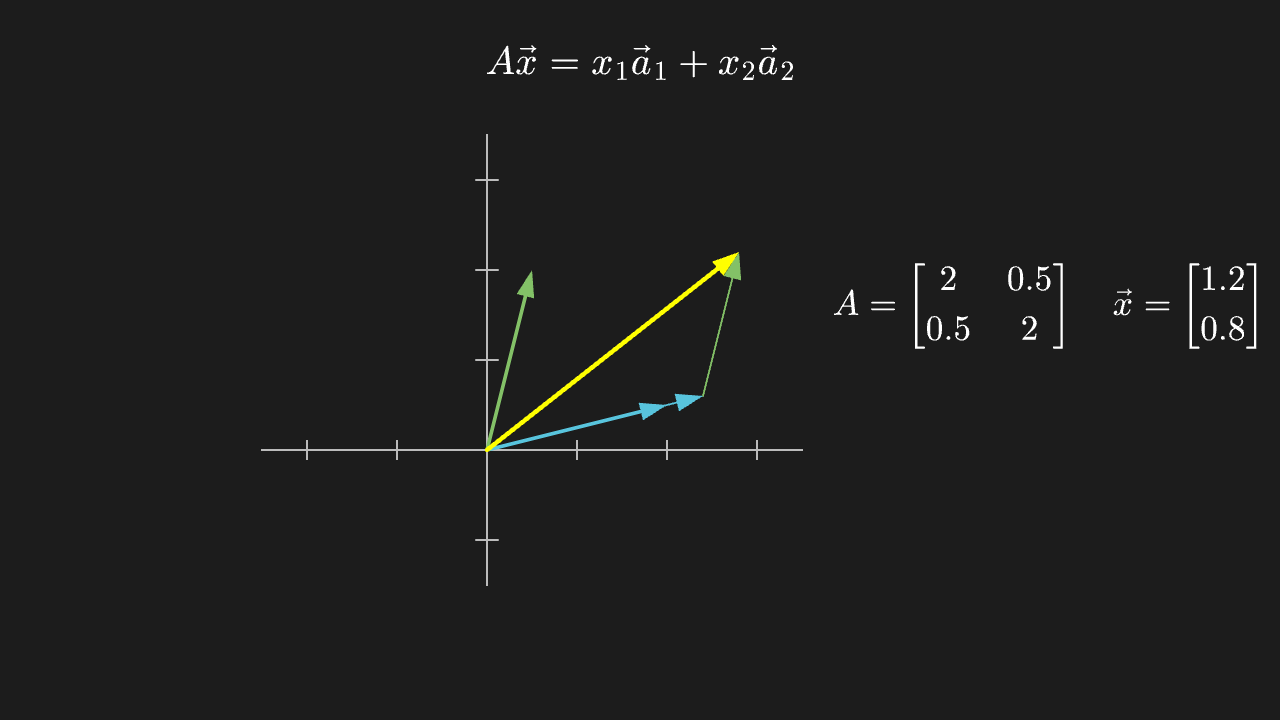
"""矩阵乘向量 = 列的线性组合

@expect 两个列向量 a₁ / a₂(蓝、绿)按系数各自伸缩后拼成平行四边形,对角线就是 A·x。
@note 讲解要点:A·x 不是「一堆乘法」,而是**用 x 的分量去加权 A 的各列再相加**——
    所以矩阵的列就是「基向量被搬到哪儿去了」,这句话是理解线性变换的入口。
"""

from manim import *


class MatrixVectorProductScene(Scene):
    def construct(self):
        # 等比:x 与 y 每个单位都用同一长度,否则正交/平行看起来会歪
        ax = Axes(
            x_range=[-2.5, 3.5, 1],
            y_range=[-1.5, 3.5, 1],
            x_length=6.0,
            y_length=5.0,
            tips=False,
            axis_config={"color": GRAY_B},
        ).shift(LEFT * 1.2)

        a1 = Arrow(ax.c2p(0, 0), ax.c2p(2, 0.5), buff=0, color=BLUE, stroke_width=4)
        a2 = Arrow(ax.c2p(0, 0), ax.c2p(0.5, 2), buff=0, color=GREEN, stroke_width=4)
        # x = (1.2, 0.8):结果 = 1.2*a1 + 0.8*a2
        x1, x2 = 1.2, 0.8
        scaled1 = Arrow(ax.c2p(0, 0), ax.c2p(2 * x1, 0.5 * x1), buff=0, color=BLUE, stroke_width=2)
        scaled2 = Arrow(ax.c2p(2 * x1, 0.5 * x1), ax.c2p(2 * x1 + 0.5 * x2, 0.5 * x1 + 2 * x2),
                        buff=0, color=GREEN, stroke_width=2)
        result = Arrow(ax.c2p(0, 0), ax.c2p(2 * x1 + 0.5 * x2, 0.5 * x1 + 2 * x2),
                       buff=0, color=YELLOW, stroke_width=5)
        # 平行四边形的另一条边(虚线补全)
        ghost = DashedLine(ax.c2p(0, 0), ax.c2p(0.5 * x2, 2 * x2), color=GREEN)

        formula = MathTex(r"A\vec x = x_1\vec a_1 + x_2\vec a_2", font_size=42).to_edge(UP)
        matrix = MathTex(r"A=\begin{bmatrix} 2 & 0.5 \\ 0.5 & 2 \end{bmatrix}",
                         r"\quad \vec x=\begin{bmatrix} 1.2 \\ 0.8 \end{bmatrix}", font_size=38).move_to([4.5, 0.6, 0])

        self.play(Create(ax), Write(formula), run_time=1.0)
        self.play(GrowArrow(a1), GrowArrow(a2), run_time=0.8)
        self.play(Write(matrix), run_time=0.6)
        self.play(GrowArrow(scaled1), GrowArrow(scaled2), run_time=1.0)
        self.play(Create(ghost), run_time=0.4)
        self.play(GrowArrow(result), run_time=0.8)
        self.play(Indicate(result, color=YELLOW), run_time=0.6)
        self.wait(0.4)
Geometric meaning of the determinant: the unit square's area scales by |det|
The yellow unit square in the grid is stretched into a parallelogram; its area goes from 1 to 2 (det=2).
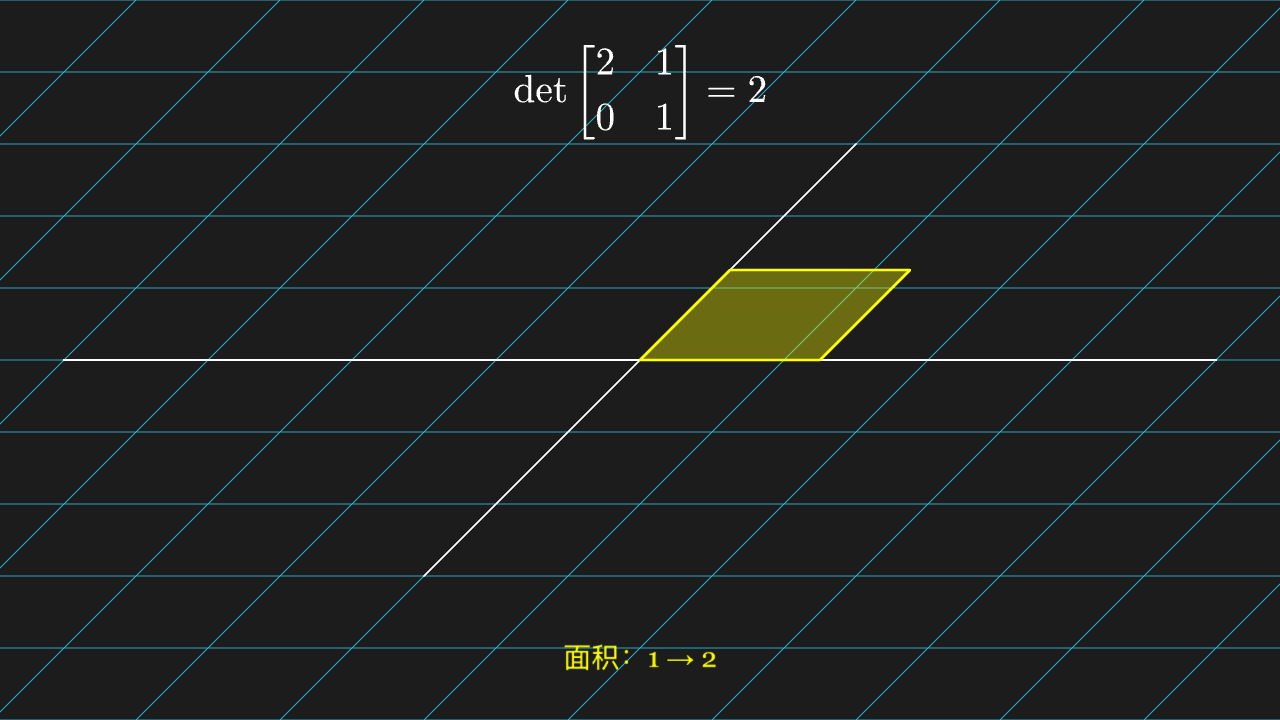
"""行列式的几何意义:单位正方形的面积被放大 |det| 倍

@expect 网格里那个黄色单位正方形被拉成平行四边形,面积从 1 变成 2(det=2)。
@note 讲解要点:行列式不是「算出来的一堆乘积」,它是**面积(体积)的缩放因子**;
    为负表示翻转了朝向,为 0 表示整个平面被压扁(下一页那条)。
"""

from manim import *


class DeterminantAreaScene(Scene):
    def construct(self):
        plane = NumberPlane(
            x_range=[-4, 4, 1],
            y_range=[-3, 3, 1],
            x_length=6.4,
            y_length=4.8,
            background_line_style={"stroke_color": GRAY_D, "stroke_width": 1},
        )
        unit = Square(side_length=1, color=YELLOW, stroke_width=3).set_fill(YELLOW, 0.35)
        unit.move_to([0.5, 0.5, 0])
        det_label = MathTex(r"\det\begin{bmatrix} 2 & 1 \\ 0 & 1 \end{bmatrix} = 2", font_size=42).to_edge(UP)
        area_label = Text("面积:1 → 2", font_size=30, color=YELLOW).to_edge(DOWN, buff=0.5)

        self.play(Create(plane), run_time=1.0)
        self.play(FadeIn(unit), Write(det_label), run_time=0.8)
        self.play(ApplyMatrix([[2, 1], [0, 1]], VGroup(plane, unit)), run_time=2.0)
        self.play(Write(area_label), run_time=0.6)
        self.wait(0.4)
Singular matrix: det=0 collapses the whole plane onto a line
The grid and the yellow square collapse onto one slanted line; the square can never regain an area.
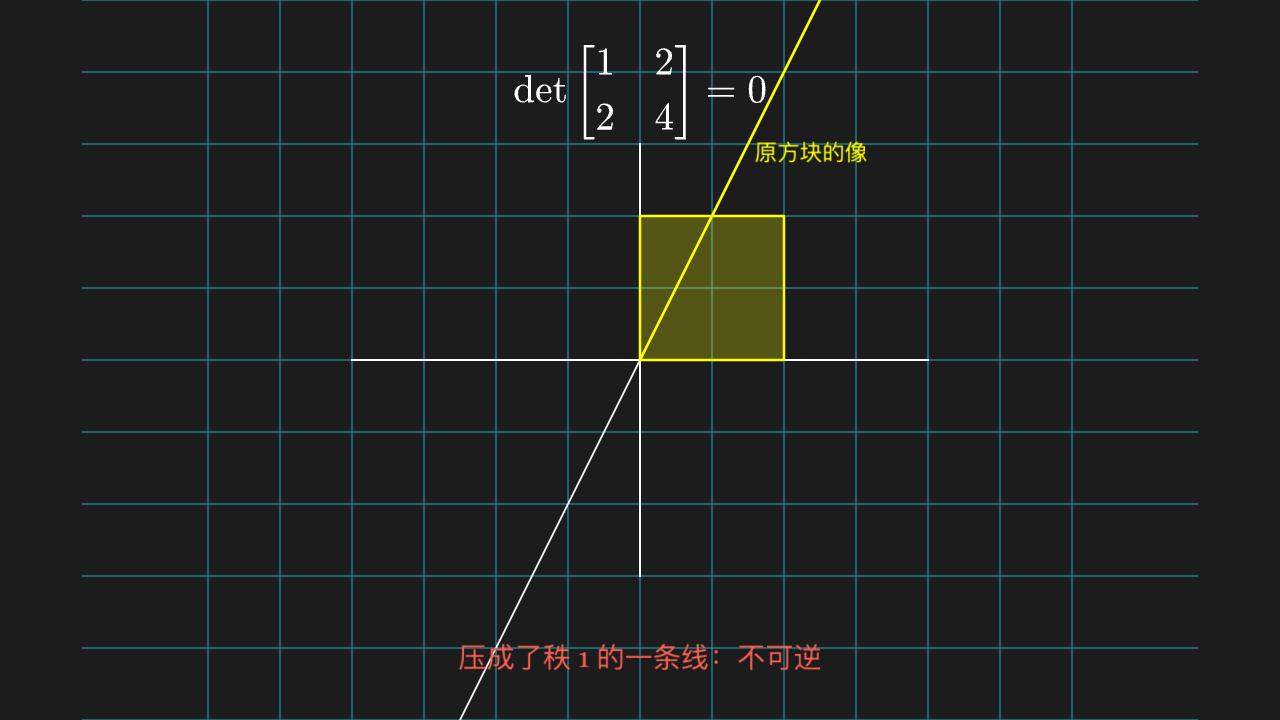
"""奇异矩阵:det=0 把整个平面压成一条线

@expect 网格连同黄色方块被压扁成一条斜线,方块永远变不回有面积的形状。
@note 讲解要点:det=0 ⇔ 矩阵不可逆 ⇔ 信息丢了(不同的点被映到同一个点),
    所以「逆矩阵不存在」不是代数上的刁难,而是几何上「压扁了就展不平」。
"""

from manim import *


class SingularMatrixScene(Scene):
    def construct(self):
        plane = NumberPlane(
            x_range=[-4, 4, 1],
            y_range=[-3, 3, 1],
            x_length=6.4,
            y_length=4.8,
            background_line_style={"stroke_color": GRAY_D, "stroke_width": 1},
        )
        block = Square(side_length=1.6, color=YELLOW, stroke_width=3).set_fill(YELLOW, 0.35)
        block.move_to([0.8, 0.8, 0])
        det_label = MathTex(r"\det\begin{bmatrix} 1 & 2 \\ 2 & 4 \end{bmatrix} = 0", font_size=42).to_edge(UP)
        note = Text("压成了秩 1 的一条线:不可逆", font_size=30, color=RED).to_edge(DOWN, buff=0.5)

        # 变换前留低透明度 ghost 在原位,ApplyMatrix 只作用实体组
        ghost_plane = plane.copy().set_opacity(0.25)
        ghost_block = block.copy().set_opacity(0.25)
        image_label = Text("原方块的像", font_size=24, color=YELLOW).move_to([1.9, 2.3, 0])

        self.play(Create(plane), run_time=1.0)
        self.play(FadeIn(block), Write(det_label), run_time=0.8)
        self.play(FadeIn(ghost_plane), FadeIn(ghost_block), run_time=0.6)
        self.play(ApplyMatrix([[1, 2], [2, 4]], VGroup(plane, block)), run_time=2.0)
        self.play(Write(note), FadeIn(image_label), run_time=0.6)
        self.wait(0.4)
Orthogonal projection: the shadow of b on a
A dashed line drops perpendicularly from the tip of b onto the line a, with a right-angle mark at the intersection; the yellow arrow is the projection vector.
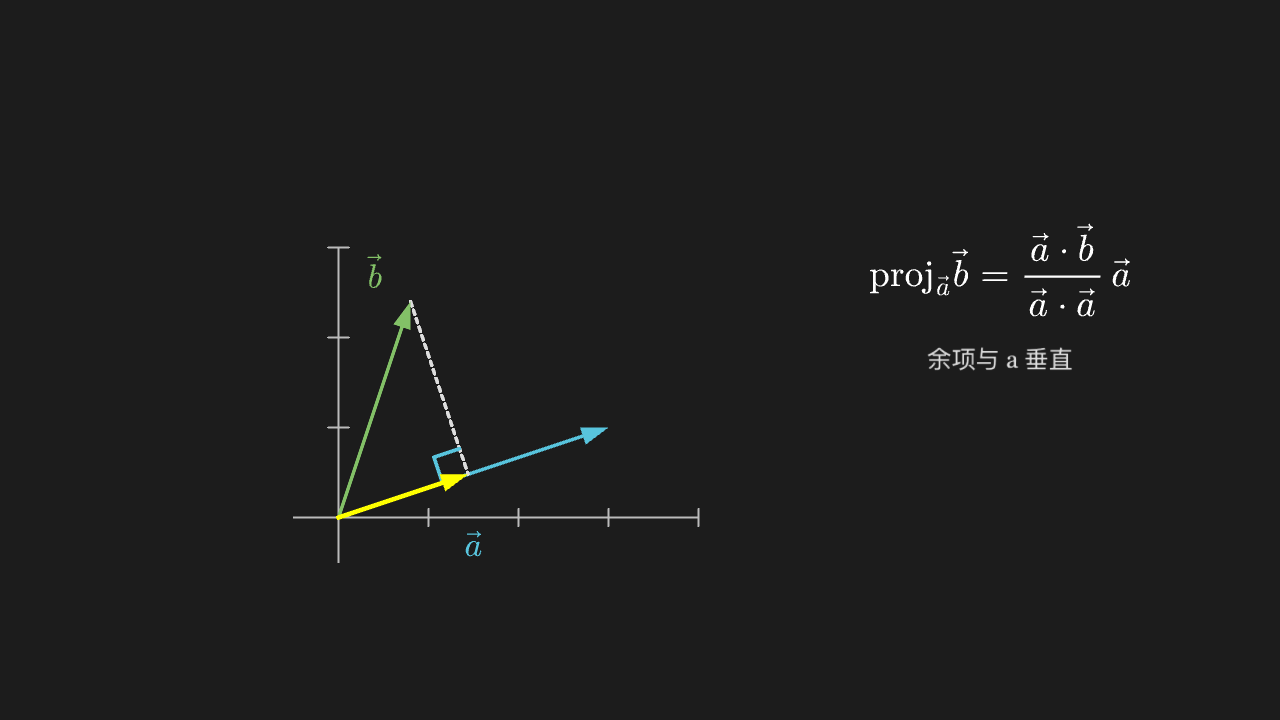
"""正交投影:b 在 a 上的影子

@expect 从 b 的末端落一条虚线垂直打到 a 直线上,交点处有个直角符号;黄色箭头就是投影向量。
@note 讲解要点:投影 = 「沿 a 方向能解释多少 b,剩下的部分与 a 垂直」。
    直角符号是关键——投影的余项一定垂直于 a,最小二乘、正交基都从这条性质长出来。
"""

from manim import *


class OrthogonalProjectionScene(Scene):
    def construct(self):
        ax = Axes(
            x_range=[-0.5, 4, 1],
            y_range=[-0.5, 3, 1],
            x_length=4.5,
            y_length=3.5,
            tips=False,
            axis_config={"color": GRAY_B},
        ).shift(LEFT * 1.6 + DOWN * 0.5)

        a_end = ax.c2p(3, 1)
        b_end = ax.c2p(0.8, 2.4)
        # proj = (a·b/|a|²) a = 0.48 a = (1.44, 0.48)
        proj_end = ax.c2p(1.44, 0.48)

        vec_a = Arrow(ax.c2p(0, 0), a_end, buff=0, color=BLUE, stroke_width=4)
        vec_b = Arrow(ax.c2p(0, 0), b_end, buff=0, color=GREEN, stroke_width=4)
        vec_p = Arrow(ax.c2p(0, 0), proj_end, buff=0, color=YELLOW, stroke_width=5)
        drop = DashedLine(b_end, proj_end, color=GRAY_A)
        mark = RightAngle(Line(ax.c2p(0, 0), proj_end), Line(proj_end, b_end), length=0.22)

        label_a = MathTex(r"\vec a", color=BLUE, font_size=36).next_to(vec_a, DOWN, buff=0.15)
        label_b = MathTex(r"\vec b", color=GREEN, font_size=36).next_to(vec_b, UP, buff=0.15)
        formula = MathTex(
            r"\mathrm{proj}_{\vec a}\vec b = \frac{\vec a\cdot\vec b}{\vec a\cdot\vec a}\,\vec a",
            font_size=40,
        ).move_to([4.0, 1.0, 0])
        note = Text("余项与 a 垂直", font_size=26, color=GRAY_A).move_to([4.0, 0.0, 0])

        self.play(Create(ax), run_time=0.8)
        self.play(GrowArrow(vec_a), GrowArrow(vec_b), Write(label_a), Write(label_b), run_time=1.0)
        self.play(Write(formula), run_time=0.8)
        self.play(Create(drop), Create(mark), run_time=0.7)
        self.play(GrowArrow(vec_p), run_time=0.8)
        self.play(Write(note), run_time=0.5)
        self.wait(0.4)
Gram–Schmidt: subtracting the projection onto the first vector
The green vector slides along the dashed line to the red position and then stands at a right angle to the blue vector (right-angle mark at the intersection).
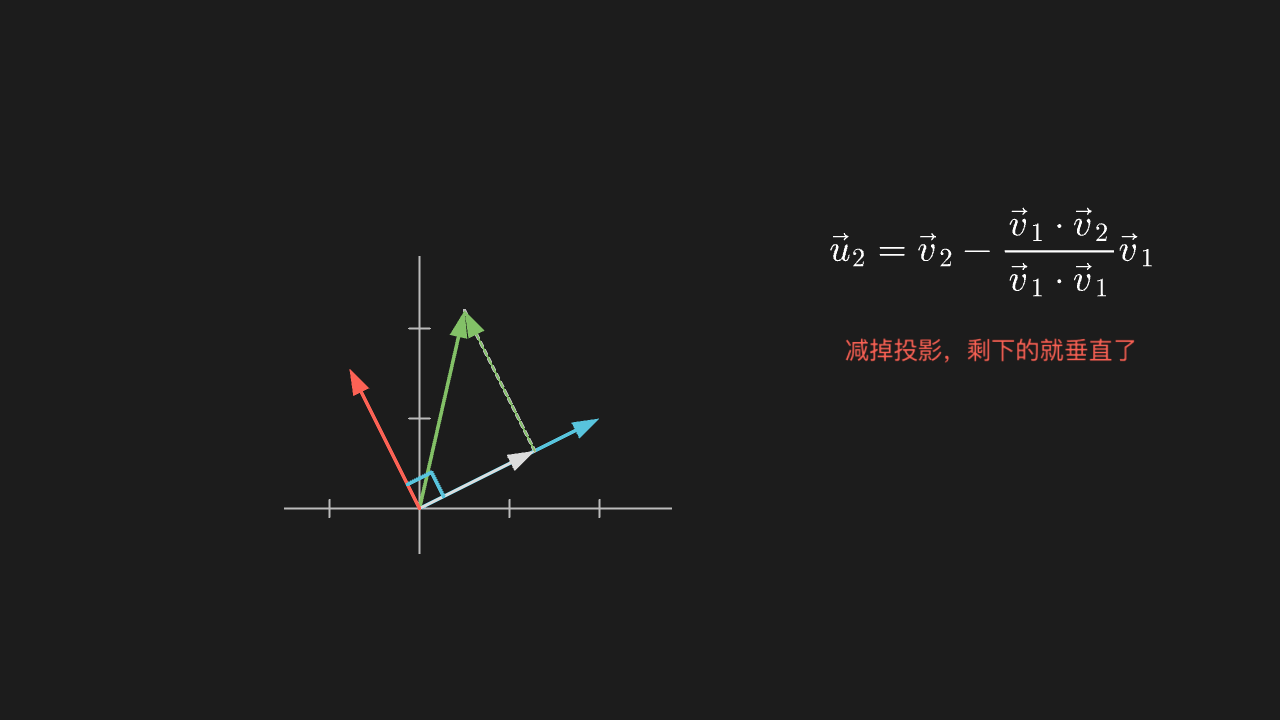
"""Gram–Schmidt:把第二个向量减掉它在第一个上的投影

@expect 绿色向量沿虚线滑到红色位置后,与蓝色向量成直角(交点处有直角符号)。
@note 讲解要点:正交化的动作只有一句「减掉投影」——余下的部分自动垂直于前者。
    这就是 QR 分解、正交基、乃至傅里叶系数一路复用的同一个动作。
"""

from manim import *


class GramSchmidtScene(Scene):
    def construct(self):
        ax = Axes(
            x_range=[-1.5, 2.8, 1],
            y_range=[-0.5, 2.8, 1],
            x_length=4.3,
            y_length=3.3,
            tips=False,
            axis_config={"color": GRAY_B},
        ).shift(LEFT * 1.8 + DOWN * 0.5)

        origin = ax.c2p(0, 0)
        v1_end = ax.c2p(2, 1)
        v2_end = ax.c2p(0.5, 2.2)
        # 投影 (a·b/a·a)a:a·b = 1 + 2.2 = 3.2,a·a = 5 → 0.64·(2,1) = (1.28, 0.64)
        proj_end = ax.c2p(1.28, 0.64)
        ortho_end = ax.c2p(0.5 - 1.28, 2.2 - 0.64)  # (-0.78, 1.56)

        v1 = Arrow(origin, v1_end, buff=0, color=BLUE, stroke_width=4)
        v2 = Arrow(origin, v2_end, buff=0, color=GREEN, stroke_width=4)
        proj = Arrow(origin, proj_end, buff=0, color=GRAY_A, stroke_width=3)
        ortho = Arrow(origin, ortho_end, buff=0, color=RED, stroke_width=4)
        slide = Arrow(ax.c2p(1.28, 0.64), ax.c2p(0.5 - 1.28 + 1.28, 2.2 - 0.64 + 0.64 - 0.0),
                      buff=0, color=GREEN, stroke_width=2)
        drop = DashedLine(v2_end, ax.c2p(1.28, 0.64), color=GRAY_B)
        mark = RightAngle(Line(origin, v1_end), Line(origin, ortho_end), length=0.2)

        formula = MathTex(r"\vec u_2 = \vec v_2 - \frac{\vec v_1\cdot\vec v_2}{\vec v_1\cdot\vec v_1}\vec v_1",
                          font_size=40).move_to([3.9, 1.2, 0])
        note = Text("减掉投影,剩下的就垂直了", font_size=26, color=RED).move_to([3.9, 0.1, 0])

        self.play(Create(ax), run_time=0.8)
        self.play(GrowArrow(v1), GrowArrow(v2), run_time=0.8)
        self.play(Create(drop), GrowArrow(proj), run_time=0.7)
        self.play(Write(formula), run_time=0.8)
        self.play(Create(slide), run_time=0.5)
        self.play(GrowArrow(ortho), Create(mark), run_time=0.9)
        self.play(Write(note), run_time=0.5)
        self.wait(0.4)
Eigen directions: vectors whose direction survives the map
On the two dashed directions the vectors stay on the same line after the map (only stretched or shortened) while a third vector visibly deflects. The three pre-image vectors stay in the frame as translucent ghosts, forming a before/after comparison with the solid post-image vectors.
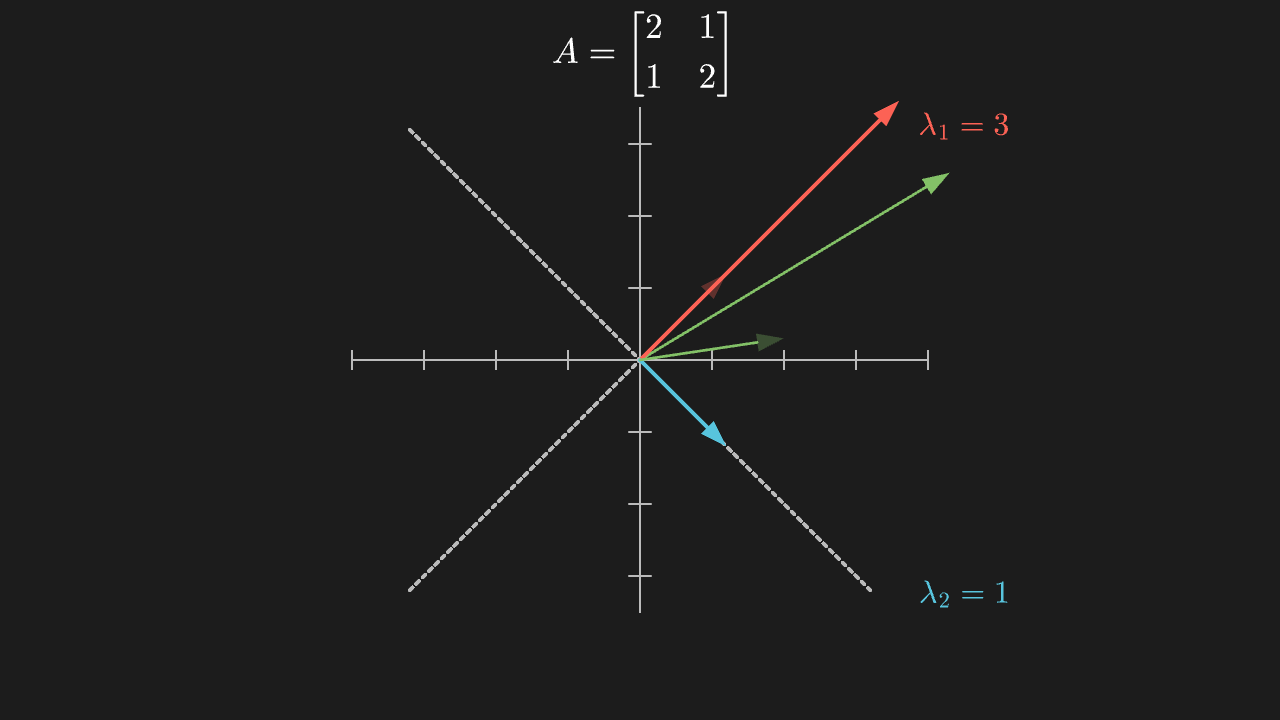
"""特征方向:变换后方向不变的向量

@expect 两条虚线标出的方向上,向量变换后仍落在同一条直线上(只被拉长/压短);第三个向量明显偏转。
    变换前三根向量以半透明 ghost 留在画面,与变换后的实色向量形成 before/after 对照。
@note 讲解要点:特征向量就是「这个变换自己的方向」——沿它走只改长度不改方向,长度比就是特征值。
    这里 (1,1) 被拉 3 倍、(1,-1) 保持 1 倍,所以 A 的两个特征值是 3 和 1。
"""

from manim import *


class EigenvectorScene(Scene):
    def construct(self):
        ax = Axes(
            x_range=[-4, 4, 1],
            y_range=[-3.5, 3.5, 1],
            x_length=6.4,
            y_length=5.6,
            tips=False,
            axis_config={"color": GRAY_B},
        )

        # 两条特征方向上的参考直线(虚)
        line_1 = DashedLine(ax.c2p(-3.2, -3.2), ax.c2p(3.2, 3.2), color=GRAY_B)
        line_2 = DashedLine(ax.c2p(-3.2, 3.2), ax.c2p(3.2, -3.2), color=GRAY_B)

        v1 = Arrow(ax.c2p(0, 0), ax.c2p(1.2, 1.2), buff=0, color=RED, stroke_width=4)
        v2 = Arrow(ax.c2p(0, 0), ax.c2p(1.2, -1.2), buff=0, color=BLUE, stroke_width=4)
        v3 = Arrow(ax.c2p(0, 0), ax.c2p(2.0, 0.3), buff=0, color=GREEN, stroke_width=3)

        label_1 = MathTex(r"\lambda_1 = 3", color=RED, font_size=34).move_to([3.6, 2.6, 0])
        label_2 = MathTex(r"\lambda_2 = 1", color=BLUE, font_size=34).move_to([3.6, -2.6, 0])
        matrix = MathTex(r"A=\begin{bmatrix} 2 & 1 \\ 1 & 2 \end{bmatrix}", font_size=38).move_to([0, 3.4, 0])

        self.play(Create(ax), Create(line_1), Create(line_2), run_time=1.0)
        self.play(GrowArrow(v1), GrowArrow(v2), GrowArrow(v3), Write(matrix), run_time=1.0)

        # 变换前 ghost:半透明副本留在画面,不参与变换,供 before/after 对照
        ghosts = [m.copy().set_opacity(0.3) for m in (v1, v2, v3)]
        self.play(*[FadeIn(g, scale=0.9) for g in ghosts], run_time=0.6)

        # 变换只作用在原向量上:箭头不进 ApplyMatrix,按手算端点重画后 Transform
        A = [[2, 1], [1, 2]]

        def apply_A(x, y):
            return (A[0][0] * x + A[0][1] * y, A[1][0] * x + A[1][1] * y)

        ends = [(1.2, 1.2), (1.2, -1.2), (2.0, 0.3)]
        colors_widths = [(RED, 4), (BLUE, 4), (GREEN, 3)]
        new_arrows = [
            Arrow(ax.c2p(0, 0), ax.c2p(*apply_A(x, y)), buff=0, color=c, stroke_width=w)
            for (x, y), (c, w) in zip(ends, colors_widths)
        ]
        self.play(
            Transform(v1, new_arrows[0]),
            Transform(v2, new_arrows[1]),
            Transform(v3, new_arrows[2]),
            run_time=2.0,
        )
        self.play(Write(label_1), Write(label_2), run_time=0.7)
        self.play(Circumscribe(v3, color=GREEN), run_time=0.6)
        self.wait(0.4)
Null space: the directions mapped to 0
The arrow along (-2,1) (red) collapses to a point after the map (a red dot at the origin); the other direction (green) maps to twice its length.
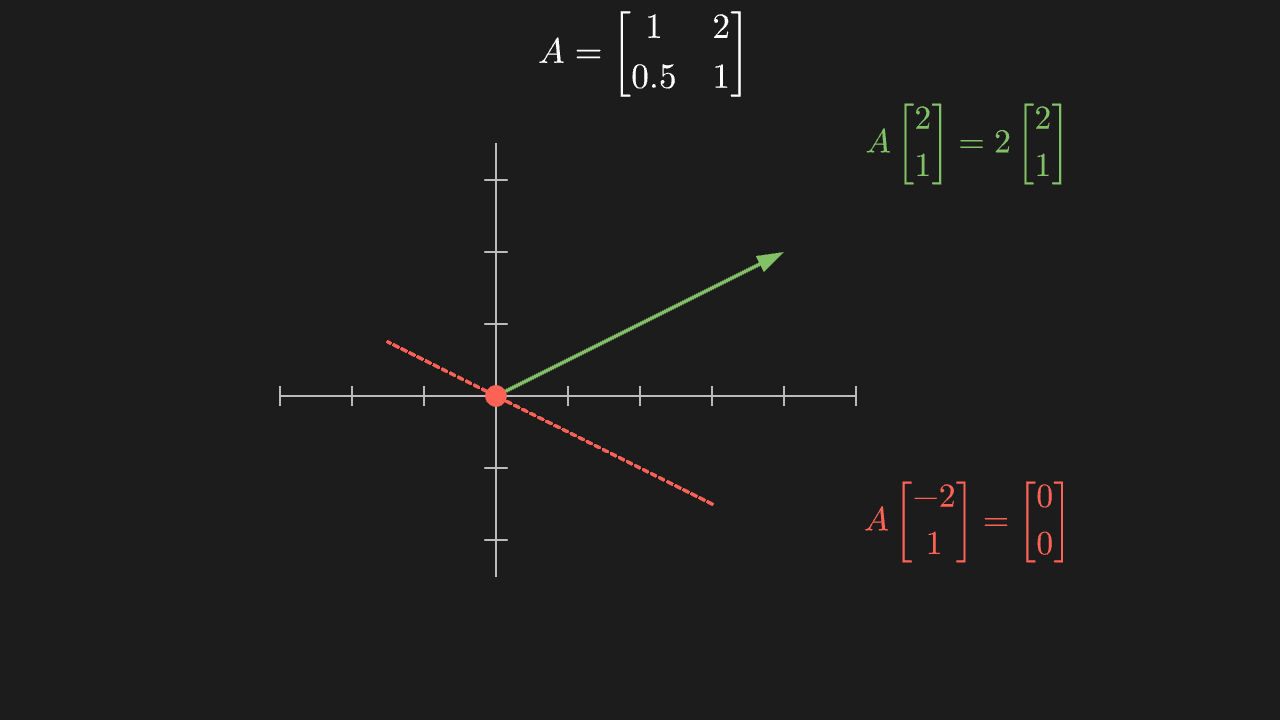
"""零空间:被映到 0 的那些方向

@expect 沿 (-2,1) 方向的箭头(红)变换后缩成一个点(原点处红点);另一个方向(绿)变换后变成它的 2 倍长。
@note 讲解要点:零空间不是「什么都没有」,而是「本来在这里、被矩阵丢掉的整个方向」。
    秩数 = 留下来(有像)的维数,二者互为一对:留下来 1 维,被丢掉就 1 维。
"""

from manim import *


class RankNullspaceScene(Scene):
    def construct(self):
        ax = Axes(
            x_range=[-3, 5, 1],
            y_range=[-2.5, 3.5, 1],
            x_length=6.4,
            y_length=4.8,
            tips=False,
            axis_config={"color": GRAY_B},
        ).shift(LEFT * 0.8)

        null_line = DashedLine(ax.c2p(3, -1.5), ax.c2p(-1.5, 0.75), color=RED)
        null_vec = Arrow(ax.c2p(0, 0), ax.c2p(-2, 1), buff=0, color=RED, stroke_width=4)
        live_vec = Arrow(ax.c2p(0, 0), ax.c2p(2, 1), buff=0, color=GREEN, stroke_width=4)
        zero_dot = Dot(ax.c2p(0, 0), radius=0.12, color=RED)

        matrix = MathTex(r"A=\begin{bmatrix} 1 & 2 \\ 0.5 & 1 \end{bmatrix}", font_size=38).move_to([0, 3.4, 0])
        to_zero = MathTex(r"A\begin{bmatrix}-2\\1\end{bmatrix}=\begin{bmatrix}0\\0\end{bmatrix}",
                          color=RED, font_size=36).move_to([3.6, -1.8, 0])
        kept = MathTex(r"A\begin{bmatrix}2\\1\end{bmatrix}=2\begin{bmatrix}2\\1\end{bmatrix}",
                       color=GREEN, font_size=36).move_to([3.6, 2.4, 0])

        self.play(Create(ax), run_time=0.8)
        self.play(GrowArrow(null_vec), GrowArrow(live_vec), Write(matrix), run_time=1.0)
        self.play(Write(kept), run_time=0.6)
        # 箭头不进 ApplyMatrix:A·(-2,1)=(0,0) 缩成原点红点;A·(2,1)=(4,2) 变 2 倍长
        live_new = Arrow(ax.c2p(0, 0), ax.c2p(4, 2), buff=0, color=GREEN, stroke_width=4)
        self.play(ReplacementTransform(null_vec, zero_dot),
                  Transform(live_vec, live_new), run_time=2.0)
        self.play(Create(null_line), Write(to_zero), run_time=0.8)
        self.play(Circumscribe(live_vec, color=GREEN), run_time=0.6)
        self.wait(0.4)
Basis change: two coordinate systems for the same vector
The blue basis and the green basis close into a parallelogram (the 0.6·b₂ closing edge drawn as a green dashed line, labelled 1.2·b₁ / 0.6·b₂); the way the yellow vector travels along them is (1.2, 0.6). Read against the standard basis, the same arrow has a different pair of coordinates.
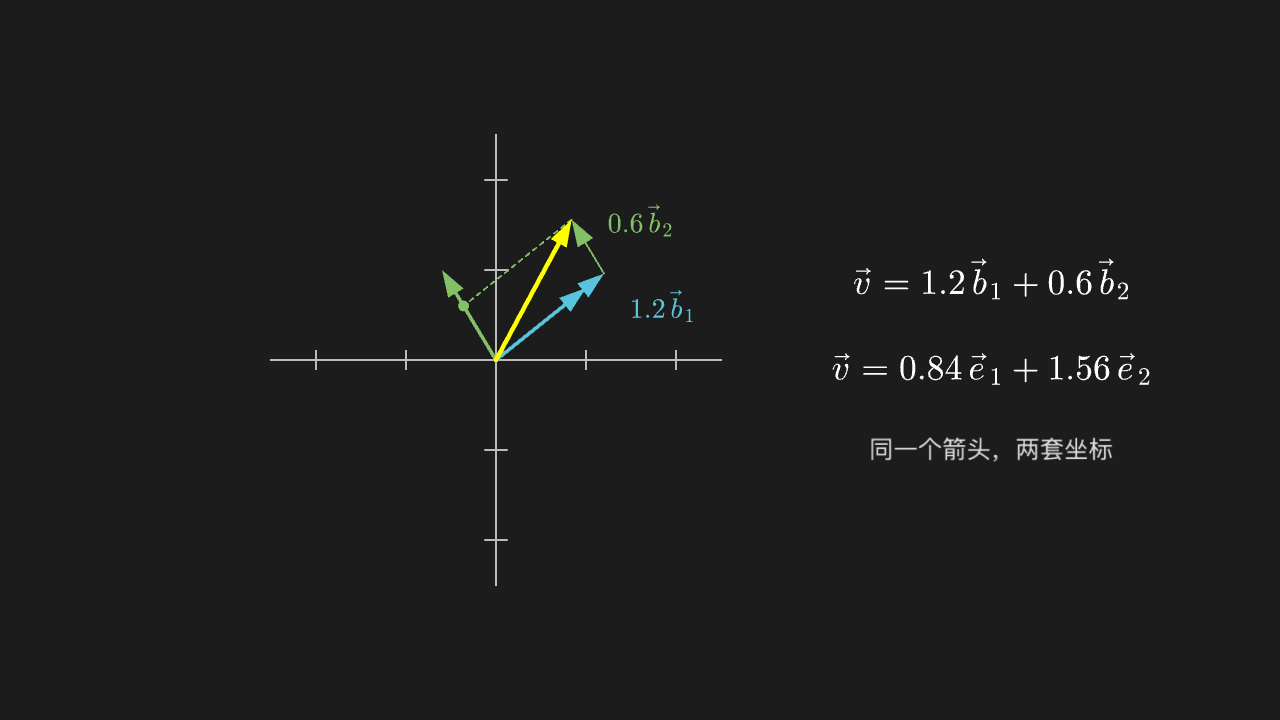
"""基变换:同一个向量的两套坐标

@expect 蓝色基与绿色基合成一个平行四边形(0.6·b₂ 那条闭合边用绿色虚线补全,并标注 1.2·b₁ / 0.6·b₂),
        黄色向量沿它们走的方式就是 (1.2, 0.6);换成标准基去看,同一根箭头的坐标变成另一组数。
@note 讲解要点:向量本身没变,变的是「用哪两把尺子量」。所以「坐标」永远是相对基而言的,
    这句话一懂,相似矩阵 A = P⁻¹BP 就不再神秘。
"""

from manim import *


class BasisChangeScene(Scene):
    def construct(self):
        ax = Axes(
            x_range=[-2.5, 2.5, 1],
            y_range=[-2.5, 2.5, 1],
            x_length=5.0,
            y_length=5.0,
            tips=False,
            axis_config={"color": GRAY_B},
        ).shift(LEFT * 1.6)

        b1 = Arrow(ax.c2p(0, 0), ax.c2p(1, 0.8), buff=0, color=BLUE, stroke_width=4)
        b2 = Arrow(ax.c2p(0, 0), ax.c2p(-0.6, 1), buff=0, color=GREEN, stroke_width=4)
        # v = 1.2*b1 + 0.6*b2 = (1.2 - 0.36, 0.96 + 0.6) = (0.84, 1.56)
        step1 = Arrow(ax.c2p(0, 0), ax.c2p(1.2, 0.96), buff=0, color=BLUE, stroke_width=2)
        step2 = Arrow(ax.c2p(1.2, 0.96), ax.c2p(0.84, 1.56), buff=0, color=GREEN, stroke_width=2)
        # 平行四边形的闭合边(v 端点 → 0.6·b₂ 角点,平行于 b₁):虚线 ghost 补全
        closing = DashedLine(ax.c2p(0.84, 1.56), ax.c2p(-0.36, 0.6), color=GREEN, stroke_width=2)
        corner = Dot(ax.c2p(-0.36, 0.6), radius=0.06, color=GREEN)
        vec = Arrow(ax.c2p(0, 0), ax.c2p(0.84, 1.56), buff=0, color=YELLOW, stroke_width=5)
        # 重合的 1.2·b₁ 与粗蓝 b₁ 用标注区分
        label_step1 = MathTex(r"1.2\,\vec b_1", color=BLUE, font_size=30).move_to(ax.c2p(1.85, 0.6))
        label_step2 = MathTex(r"0.6\,\vec b_2", color=GREEN, font_size=30).move_to(ax.c2p(1.6, 1.55))

        coords_new = MathTex(r"\vec v = 1.2\,\vec b_1 + 0.6\,\vec b_2", font_size=38).move_to([3.9, 0.9, 0])
        coords_std = MathTex(r"\vec v = 0.84\,\vec e_1 + 1.56\,\vec e_2", font_size=38).move_to([3.9, -0.1, 0])
        note = Text("同一个箭头,两套坐标", font_size=26, color=GRAY_A).move_to([3.9, -1.0, 0])

        self.play(Create(ax), run_time=0.8)
        self.play(GrowArrow(b1), GrowArrow(b2), run_time=0.8)
        self.play(Write(coords_new), run_time=0.6)
        self.play(GrowArrow(step1), GrowArrow(step2), Create(closing), Create(corner), run_time=1.0)
        self.play(Write(label_step1), Write(label_step2), run_time=0.6)
        self.play(GrowArrow(vec), run_time=0.8)
        self.play(Write(coords_std), Write(note), run_time=0.8)
        self.wait(0.4)
Composing rotation matrices: two 30° turns equal one 60° turn
Grid and yellow square are turned 30° and then 30° again; the final pose coincides exactly with the single 60° turn (dashed reference).
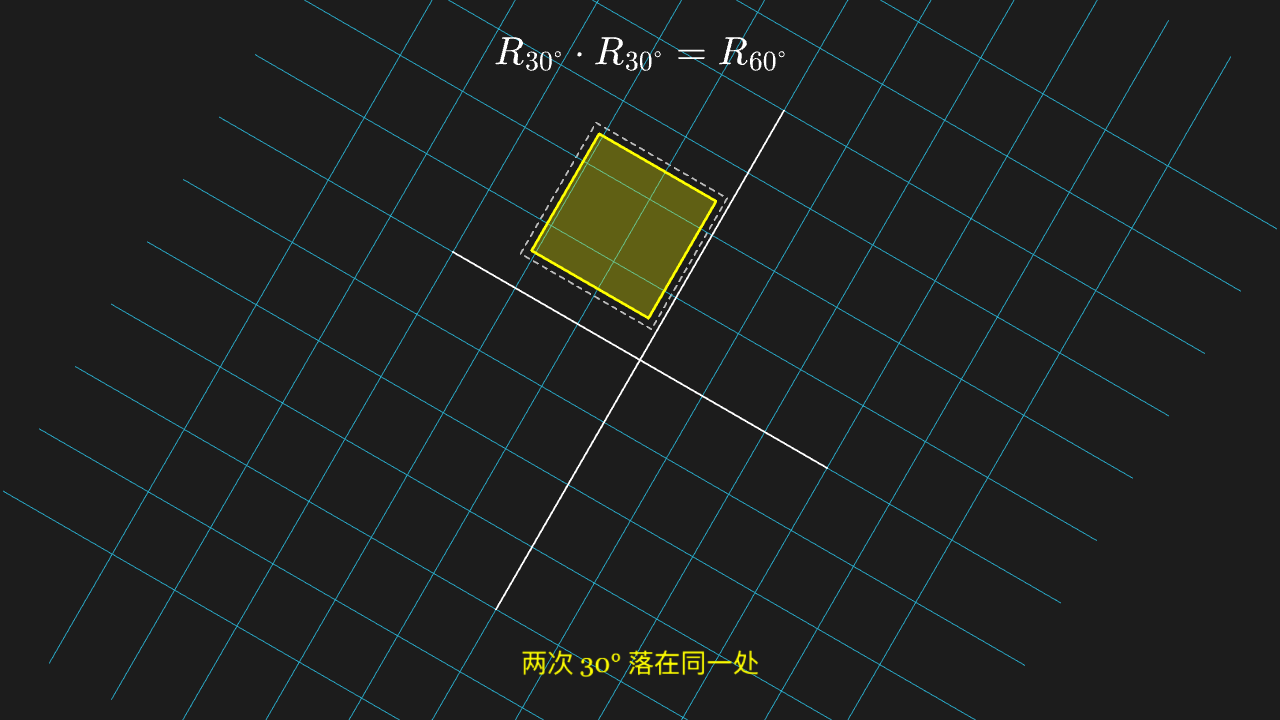
"""旋转矩阵的复合:转两次 30° 等于转一次 60°

@expect 网格与黄色方块先被转 30°、再转 30°,两次之后的姿态与「一次转 60°」(虚线参考)完全重合。
@note 讲解要点:矩阵乘法就是「先做右边那个、再做左边那个」,两个旋转矩阵乘起来还是旋转矩阵——
    这就是「矩阵乘法为什么这么定义」的动机。
"""

from manim import *
import math


class RotationCompositionScene(Scene):
    def construct(self):
        plane = NumberPlane(
            x_range=[-4, 4, 1],
            y_range=[-3, 3, 1],
            x_length=6.4,
            y_length=4.8,
            background_line_style={"stroke_color": GRAY_D, "stroke_width": 1},
        )
        block = Square(side_length=1.5, color=YELLOW, stroke_width=3).set_fill(YELLOW, 0.3)
        block.move_to([1.2, 0.9, 0])
        figure = VGroup(plane, block)

        half = math.pi / 6  # 30°
        r30 = [[math.cos(half), -math.sin(half)], [math.sin(half), math.cos(half)]]

        # 一次转 60° 的参考位置:虚线方块(手算角点)且外扩一圈,让「完全重合」可对照
        whole = math.pi / 3  # 60°
        target_center = [
            1.2 * math.cos(whole) - 0.9 * math.sin(whole),
            1.2 * math.sin(whole) + 0.9 * math.cos(whole),
            0,
        ]
        half_s = 0.75
        corners = []
        for sx in (-1, 1):
            for sy in (-1, 1):
                px, py = sx * half_s, sy * half_s
                corners.append([
                    target_center[0] + px * math.cos(whole) - py * math.sin(whole),
                    target_center[1] + px * math.sin(whole) + py * math.cos(whole),
                    0,
                ])
        ring = [0, 1, 3, 2]  # 角点环序
        target = VGroup(*[
            DashedLine(corners[ring[i]], corners[ring[(i + 1) % 4]], color=GRAY_B, stroke_width=2)
            for i in range(4)
        ]).scale(1.12)

        formula = MathTex(r"R_{30^\circ} \cdot R_{30^\circ} = R_{60^\circ}", font_size=42).move_to([0, 3.4, 0])
        note = Text("两次 30° 落在同一处", font_size=28, color=YELLOW).to_edge(DOWN, buff=0.45)

        self.play(Create(plane), FadeIn(target), Write(formula), run_time=1.0)
        self.play(FadeIn(block), run_time=0.4)
        self.play(ApplyMatrix(r30, VGroup(plane, block)), run_time=1.5)
        self.play(ApplyMatrix(r30, VGroup(plane, block)), run_time=1.5)
        self.play(Write(note), run_time=0.6)
        self.play(Flash(target, color=GRAY_A, line_length=0.25, flash_radius=1.2), run_time=0.8)
        self.wait(0.4)
Least squares: fitted line and residuals
A blue fitted line above five data points, with each point's vertical residual drawn as a grey dashed line of obvious length.
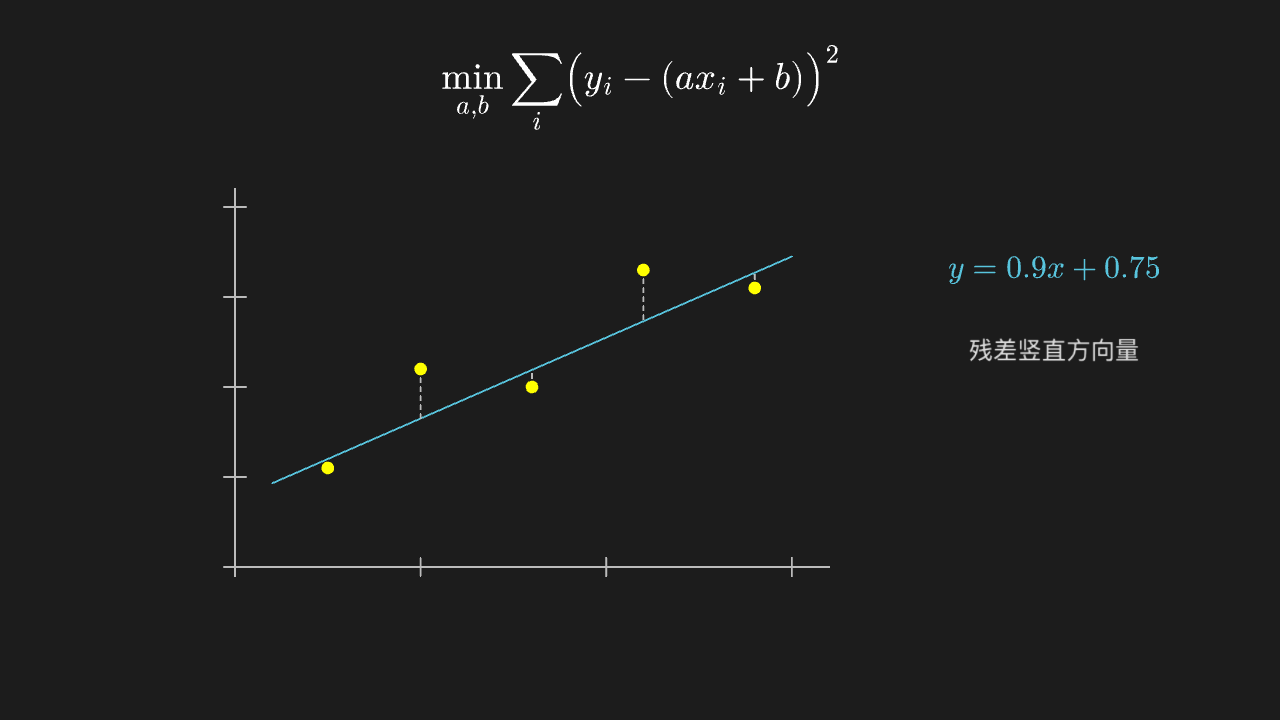
"""最小二乘:拟合直线与残差

@expect 五个数据点上方有一条蓝色拟合直线,每个点到直线的竖直残差用灰色虚线画出、长短一目了然。
@note 讲解要点:数据不可能刚好排在一条线上,所以「解不存在」;退一步求**让残差平方和最小**的那条线。
    残差竖线与直线垂直(图的纵横比一致),所以这套图里直角是看得出来的。
"""

from manim import *


class LeastSquaresScene(Scene):
    def construct(self):
        ax = Axes(
            x_range=[0, 3.2, 1],
            y_range=[0, 4.2, 1],
            x_length=6.6,
            y_length=4.2,
            tips=False,
            axis_config={"color": GRAY_B},
        ).shift(LEFT * 1.2 + DOWN * 0.2)

        xs = [0.5, 1.0, 1.6, 2.2, 2.8]
        ys = [1.1, 2.2, 2.0, 3.3, 3.1]
        points = VGroup(*[Dot(ax.c2p(x, y), radius=0.07, color=YELLOW) for x, y in zip(xs, ys)])

        fit = ax.plot(lambda x: 0.9 * x + 0.75, x_range=[0.2, 3.0], color=BLUE)
        residuals = VGroup(*[
            DashedLine(ax.c2p(x, y), ax.c2p(x, 0.9 * x + 0.75), color=GRAY_B, stroke_width=2)
            for x, y in zip(xs, ys)
        ])

        title = MathTex(r"\min_{a,b}\sum_i\bigl(y_i - (ax_i+b)\bigr)^2", font_size=40).to_edge(UP)
        fit_label = MathTex(r"y = 0.9x + 0.75", color=BLUE, font_size=34).move_to([4.6, 1.0, 0])
        note = Text("残差竖直方向量", font_size=26, color=GRAY_A).move_to([4.6, 0.1, 0])

        self.play(Create(ax), Write(title), run_time=1.0)
        self.play(LaggedStart(*[FadeIn(dot) for dot in points], lag_ratio=0.15), run_time=1.0)
        self.play(Create(fit), Write(fit_label), run_time=0.9)
        self.play(LaggedStart(*[Create(line) for line in residuals], lag_ratio=0.12), run_time=1.0)
        self.play(Write(note), run_time=0.5)
        self.wait(0.4)
Quadratic forms: positive-definite ellipses vs indefinite hyperbolas
Concentric ellipses on the left (positive definite: every direction curves upward), a pair of hyperbola branches on the right (indefinite: some direction curves downward).
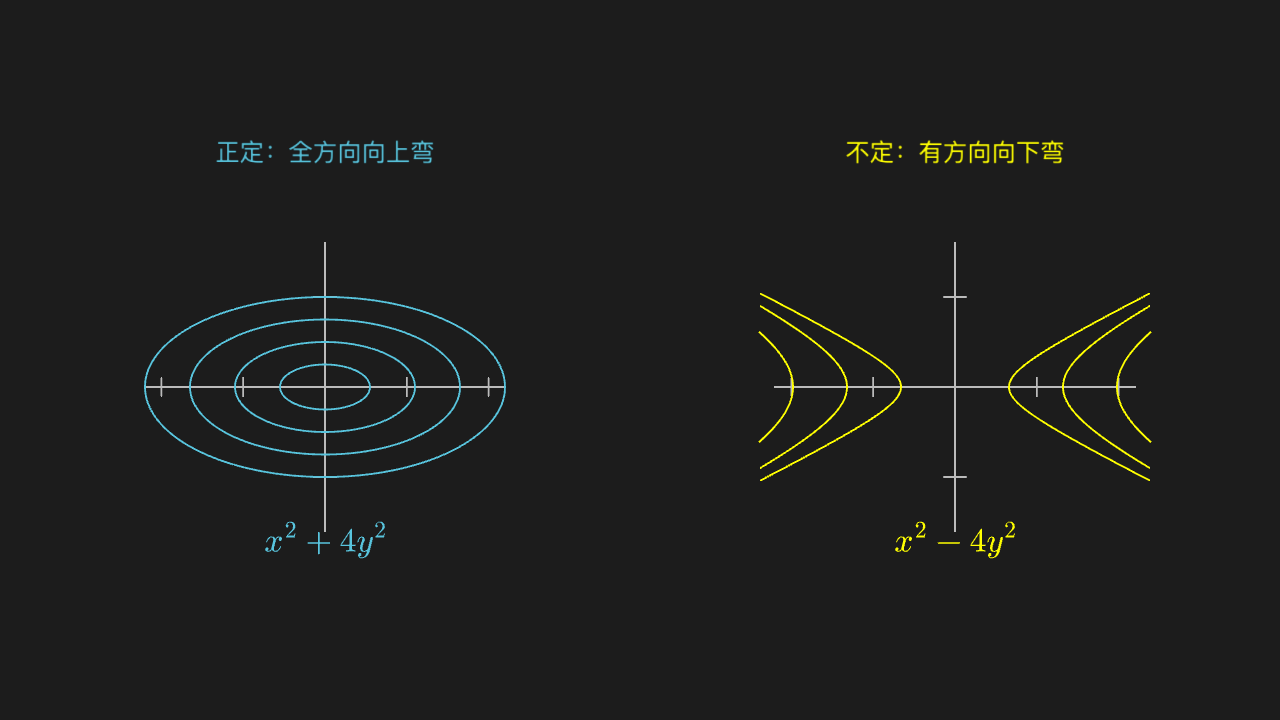
"""二次型:正定的椭圆 vs 不定的双曲

@expect 左边一组同心椭圆(正定:所有方向都往上弯),右边一对双曲分支(不定:有的方向往下弯)。
@note 讲解要点:二次型的「正定 / 不定」就是它的等高线是闭曲线还是开口曲线——
    判断正定不用背西尔维斯特判据,看形状就够了。
"""

from manim import *
import numpy as np


class QuadraticFormScene(Scene):
    def construct(self):
        left = Axes(
            x_range=[-2.2, 2.2, 1],
            y_range=[-1.6, 1.6, 1],
            x_length=4.0,
            y_length=3.2,
            tips=False,
            axis_config={"color": GRAY_B},
        ).shift(LEFT * 3.5 + DOWN * 0.3)
        right = Axes(
            x_range=[-2.2, 2.2, 1],
            y_range=[-1.6, 1.6, 1],
            x_length=4.0,
            y_length=3.2,
            tips=False,
            axis_config={"color": GRAY_B},
        ).shift(RIGHT * 3.5 + DOWN * 0.3)

        # 正定:x² + 4y² = r² 的等高线是椭圆
        ellipses = VGroup(*[
            ParametricFunction(lambda t, r=r: [r * np.cos(t), 0.5 * r * np.sin(t), 0],
                               t_range=[0, TAU, 0.02], color=BLUE).shift(LEFT * 3.5 + DOWN * 0.3)
            for r in [0.5, 1.0, 1.5, 2.0]
        ])
        # 不定:x² - 4y² = r² 的等高线是双曲分支(t_range 按每条 r 裁到轴框内,x 方向先出界)
        branches = VGroup()
        for r in [0.6, 1.2, 1.8]:
            t_max = min(np.arccosh(2.2 / r), np.arcsinh(1.6 / (0.5 * r))) - 0.02
            for sign in [1, -1]:
                branches.add(ParametricFunction(
                    lambda t, r=r, sign=sign, t_max=t_max: [sign * r * np.cosh(t), 0.5 * r * np.sinh(t), 0],
                    t_range=[-t_max, t_max, 0.02], color=YELLOW,
                ).shift(RIGHT * 3.5 + DOWN * 0.3))

        left_title = Text("正定:全方向向上弯", font_size=26, color=BLUE).move_to([-3.5, 2.3, 0])
        right_title = Text("不定:有方向向下弯", font_size=26, color=YELLOW).move_to([3.5, 2.3, 0])
        left_formula = MathTex(r"x^2+4y^2", color=BLUE, font_size=36).move_to([-3.5, -2.0, 0])
        right_formula = MathTex(r"x^2-4y^2", color=YELLOW, font_size=36).move_to([3.5, -2.0, 0])

        self.play(Create(left), Create(right), run_time=1.0)
        self.play(Write(left_title), Write(left_formula), run_time=0.6)
        self.play(LaggedStart(*[Create(item) for item in ellipses], lag_ratio=0.15), run_time=1.4)
        self.play(Write(right_title), Write(right_formula), run_time=0.6)
        self.play(LaggedStart(*[Create(item) for item in branches], lag_ratio=0.1), run_time=1.6)
        self.wait(0.4)
Geometric meaning of SVD: rotate, stretch, rotate again
The yellow circle becomes a tilted ellipse in three steps (rotate 40°, stretch along the axes, rotate -25°); the middle step shows plainly that the two directions are stretched differently.
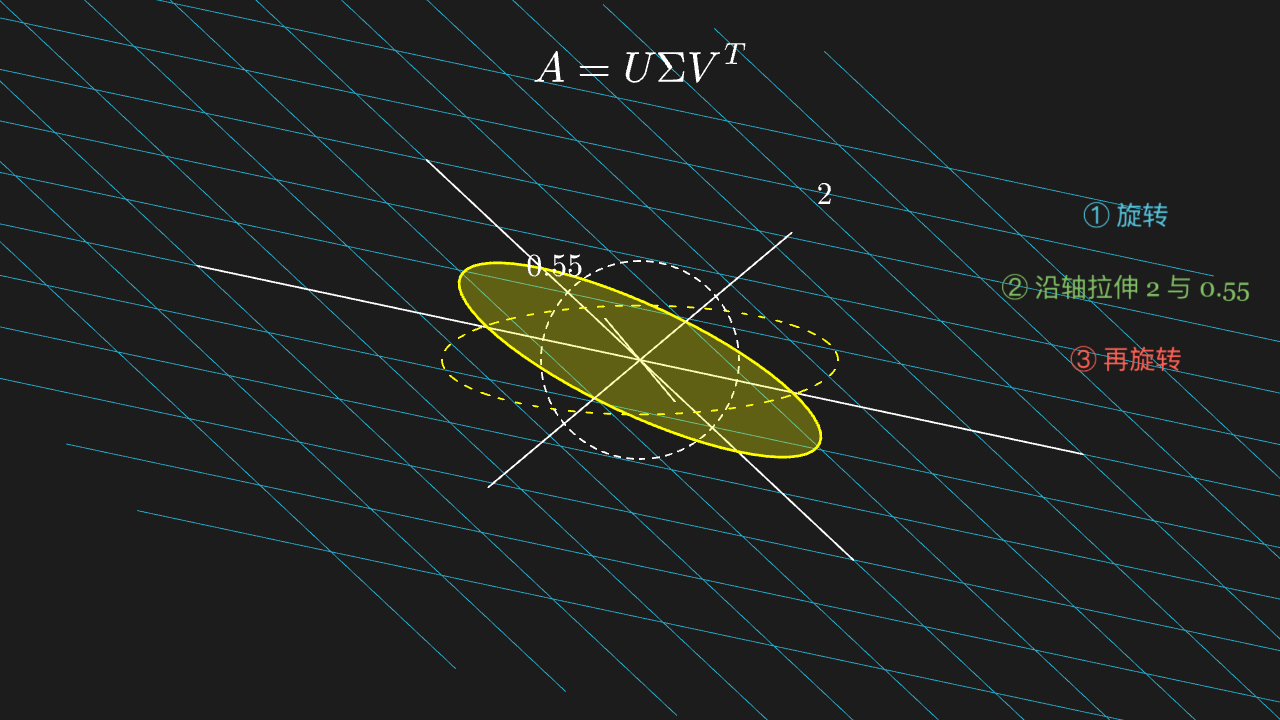
"""SVD 的几何含义:旋转 → 拉伸 → 再旋转

@expect 黄色圆经过三步(转 40°、沿轴拉伸、再转 -25°)变成一个倾斜的椭圆;
        中间那一步能明显看出两个方向被拉得不一样。
@note 讲解要点:任何矩阵都拆成「转一下、沿坐标轴拉一下、再转一下」——这就是 SVD。
    奇异值就是拉伸那两个倍数,左右两个旋转就是两套正交基的朝向。
"""

from manim import *
import math


class SvdGeometryScene(Scene):
    def construct(self):
        plane = NumberPlane(
            x_range=[-4, 4, 1],
            y_range=[-3, 3, 1],
            x_length=6.4,
            y_length=4.8,
            background_line_style={"stroke_color": GRAY_D, "stroke_width": 1},
        )
        disk = Circle(radius=1.1, color=YELLOW, stroke_width=3).set_fill(YELLOW, 0.3)
        figure = VGroup(plane, disk)

        theta1 = math.radians(40)
        v = [[math.cos(theta1), -math.sin(theta1)], [math.sin(theta1), math.cos(theta1)]]
        sigma = [[2.0, 0], [0, 0.55]]
        theta2 = math.radians(-25)
        u = [[math.cos(theta2), -math.sin(theta2)], [math.sin(theta2), math.cos(theta2)]]

        # \mathsf / \mathcal / \mathbb 一律别用:KaTeX 字体切换要动态加载,这里只会整段画成空
        caption = MathTex(r"A = U \Sigma V^{T}", font_size=46).move_to([0, 3.3, 0])
        # 混合说明逐行绝对定位在右侧留白区,不压图形
        step_1 = Text("① 旋转", font_size=28, color=BLUE).move_to([5.4, 1.6, 0])
        step_2 = Text("② 沿轴拉伸 2 与 0.55", font_size=28, color=GREEN).move_to([5.4, 0.8, 0])
        step_3 = Text("③ 再旋转", font_size=28, color=RED).move_to([5.4, 0.0, 0])

        # ghost 层:原始圆(白虚线)与中间态椭圆(黄虚线,主轴沿拉伸方向的 40° 朝向)
        ghost_circle = DashedVMobject(
            disk.copy().set_fill(opacity=0).set_stroke(WHITE, 2), num_dashes=48)
        ghost_mid = DashedVMobject(
            Ellipse(width=4.4, height=1.21, color=YELLOW, stroke_width=2)
            .set_fill(opacity=0)
            .rotate(theta1),
            num_dashes=48,
        )
        major_axis = Line(start=[-2.2 * math.cos(theta1), -2.2 * math.sin(theta1), 0],
                          end=[2.2 * math.cos(theta1), 2.2 * math.sin(theta1), 0],
                          stroke_color=WHITE, stroke_width=2)
        minor_axis = Line(start=[0.605 * math.cos(theta1 + math.pi / 2), 0.605 * math.sin(theta1 + math.pi / 2), 0],
                          end=[-0.605 * math.cos(theta1 + math.pi / 2), -0.605 * math.sin(theta1 + math.pi / 2), 0],
                          stroke_color=WHITE, stroke_width=2)
        # MathTex 定位一律 move_to 绝对坐标
        sigma_major = MathTex("2", font_size=34, color=WHITE).move_to([2.05, 1.85, 0])
        sigma_minor = MathTex("0.55", font_size=34, color=WHITE).move_to([-0.95, 1.05, 0])

        self.play(Create(plane), FadeIn(disk), Write(caption), run_time=1.0)
        self.play(Write(step_1), run_time=0.4)
        self.play(ApplyMatrix(v, figure), run_time=1.2)
        self.play(Write(step_2), run_time=0.4)
        self.play(ApplyMatrix(sigma, figure), run_time=1.2)
        self.play(FadeIn(ghost_mid), Write(step_3), run_time=0.6)
        self.play(ApplyMatrix(u, figure), run_time=1.2)
        self.play(FadeIn(ghost_circle), Create(major_axis), Create(minor_axis),
                  Write(sigma_major), Write(sigma_minor), run_time=0.8)
        self.wait(0.4)