Updaters and trails
TracedPath trails, tracker-driven positions, (m, dt) updaters, clear_updaters and the UpdateFromFunc family.
This page lists 6 examples. The code is imported from corpus/examples/updater/; the screenshots are end states rendered on real machines.
TracedPath follows a mobject
A trail line grows behind the moving dot and coincides with the path travelled.
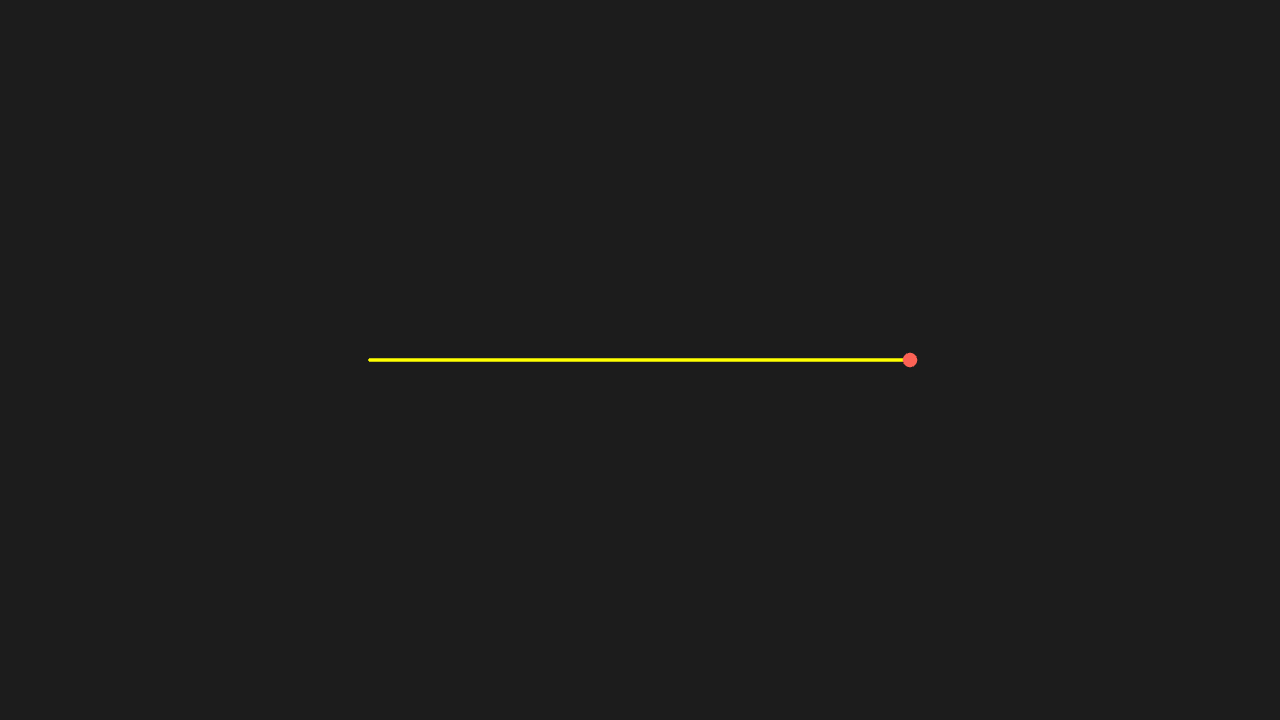
"""TracedPath 跟随物体

@expect 点移动时身后拖出一条轨迹线,轨迹与走过的路径重合。
@note ⚠️ 与 CE 写法不同:CE 收函数 dot.get_center,manim-web 收物体本身——技能文档已注明
"""

from manim import *


class TracedPathScene(Scene):
    def construct(self):
        dot = Dot(point=[-3, 0, 0], color=RED)
        path = TracedPath(dot, stroke_color=YELLOW)
        self.add(path, dot)
        self.play(dot.animate.shift(RIGHT * 6))
        self.wait(0.3)
Position driven by a tracker
As the tracker's value is animated, the dot moves to the matching position (printed coordinates agree with the picture). Self-evidence: tick 2 on the NumberLine at the bottom coincides with where the red dot settles.
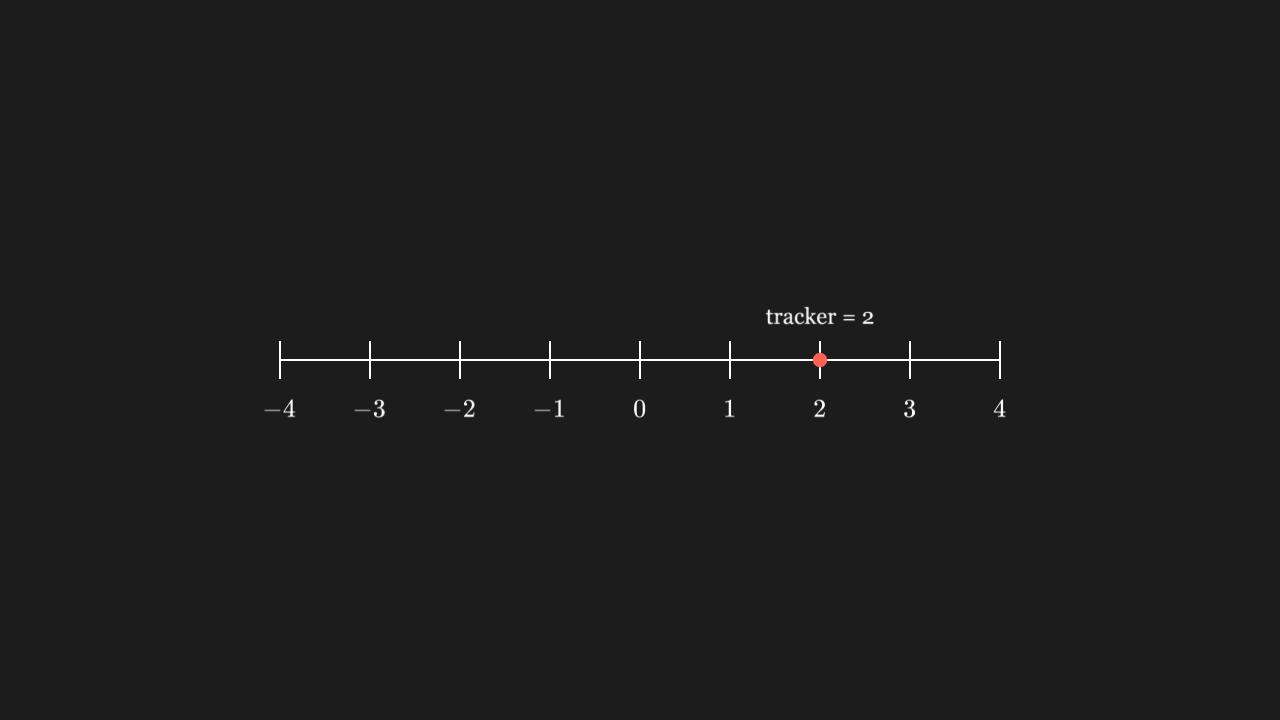
"""用 tracker 驱动位置

@expect tracker 的值被动画推进时,点跟着移到对应位置(print 出的坐标与画面一致)。
自证:底部 NumberLine 的刻度 2 与红点落定位置重合。"""

from manim import *


class ValueDrivenScene(Scene):
    def construct(self):
        tracker = ValueTracker(0)
        dot = Dot(color=RED)
        dot.add_updater(lambda m: m.move_to([tracker.get_value(), 0, 0]))
        # length=8:8 个单位格对应 8 个场景单位,数轴 1:1,刻度 2 就在场景 x=2
        line = NumberLine(x_range=[-4, 4, 1], include_numbers=True, length=8)
        label = Text("tracker = 2", font_size=24)
        self.add(tracker, dot, line)
        self.play(tracker.animate.set_value(2), run_time=1)
        self.wait(0.3)
        # 等 updater flush 后点已落在 (2,0),label 才跟着点走
        label.next_to(dot, UP)
        self.play(FadeIn(label))
        self.wait(0.3)
Updater taking (m, dt)
A (m, dt) updater advances with real time during wait, not only during animations.

"""更新器收 (m, dt) 两个参数

@expect (m, dt) 更新器在 wait 期间按真实时间推进,不是只在动画里动。
@note manim-web 的 updater 签名是 (mobject, dt)
"""

from manim import *


class WithDtScene(Scene):
    def construct(self):
        dot = Dot(point=LEFT * 3, color=RED)
        def step(m, dt):
            m.shift(RIGHT * dt * 2)
        dot.add_updater(step)
        self.add(dot)
        self.play(dot.animate.shift(RIGHT * 0.01), run_time=1)
        self.wait(0.3)
clear_updaters stops the following
After clear_updaters the mobject stays put: further tracker changes no longer move it.

"""clear_updaters 停掉跟随

@expect clear_updaters 之后物体停住:tracker 再变它也不跟。"""

from manim import *


class ClearScene(Scene):
    def construct(self):
        tracker = ValueTracker(0)
        dot = Dot(color=RED)
        dot.add_updater(lambda m: m.move_to([tracker.get_value(), 0, 0]))
        self.add(tracker, dot)
        self.play(tracker.animate.set_value(2), run_time=1)
        dot.clear_updaters()
        self.play(tracker.animate.set_value(0), run_time=1)
        self.wait(0.3)
Number follows the tracker
The number follows the tracker live; it does not jump to the final value at the end.

"""数字跟着 tracker 变

@expect 数字实时跟着 tracker 变(不是播完才跳到终值)。"""

from manim import *


class DecimalScene(Scene):
    def construct(self):
        tracker = ValueTracker(0)
        num = DecimalNumber(0, num_decimal_places=1)
        num.to_corner(UR)
        num.add_updater(lambda m: m.set_value(tracker.get_value()))
        self.add(tracker, num)
        self.play(tracker.animate.set_value(5), run_time=1)
        self.wait(0.3)
Animations driving update functions (UpdateFromFunc / UpdateFromAlphaFunc)
The update function is driven during the animation and the m it receives answers to CE method names (a fixed wrapping incident).

"""用动画驱动更新函数(UpdateFromFunc / UpdateFromAlphaFunc)

@expect 更新函数在动画期间被驱动,回调里拿到的 m 能用 CE 方法名操作(修过的包装事故)。
@note 回调里的第一个参数是真 Mobject(适配层包过),CE 方法名照写即可:
      `lambda m: m.set_opacity(...)`。
      踩过的坑:这两个动画在 manim-web 里按回调(mobject, alpha) 调,而那个 mobject 是它自己的
      裸 JS 对象(只有 camelCase 方法)——不包一层就是 AttributeError,且抛在渲染循环里,
      播放的 promise 永不 resolve,页面一直转(真机事故)。适配层已在 _FUNC_ANIMATIONS 里包好。
      回调参数个数按自己的签名算:UpdateFromFunc 习惯写单参,写双参也能收下 alpha。
"""

from manim import *


class UpdateFromFuncScene(Scene):
    def construct(self):
        square = Square(side_length=2, color=BLUE)
        self.add(square)

        # 单参回调:整段动画期间反复调用(UpdateFromFunc 的 alpha 一般用不上)
        self.play(
            UpdateFromFunc(square, lambda m: m.set_stroke(color=YELLOW, width=8)),
            run_time=0.6,
        )

        # 双参回调:alpha 从 0 走到 1,适合「随进度改某个属性」
        self.play(
            UpdateFromAlphaFunc(square, lambda m, alpha: m.set_fill(BLUE, alpha)),
            run_time=0.8,
        )
        # 适配层在动画终态会丢掉回调刷出来的填充;play 外的 set_fill 不触发重绘,
        # 故再用一条 .animate 动画显式补上不透明蓝填充(终帧必须实心蓝)
        self.play(square.animate.set_fill(BLUE, 1.0), run_time=0.4)
        self.wait(0.3)